CCNVR
Supports ONVIF, RTSP, RTMP and GB28181, with live view, recording playback, recording storage and one-click deployment.
System architecture
From device onboarding to recording storage and playback, CCNVR is built on a modular architecture.
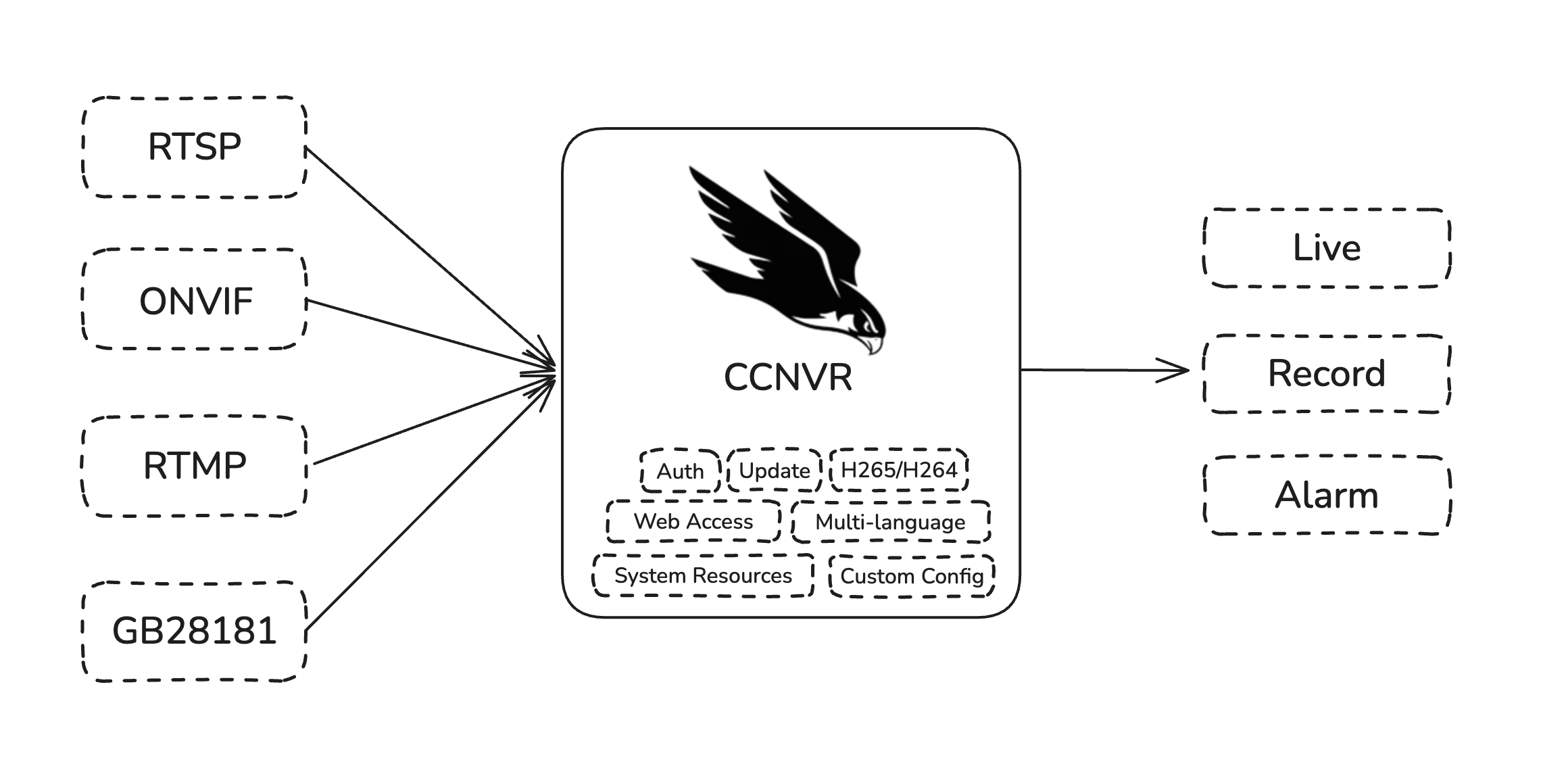
Features
From device onboarding and live view to recording playback and system operations, one process handles it all.
Multi-protocol device onboarding
Connect over ONVIF auto-discovery, RTSP, RTMP and GB28181-2022, compatible with network cameras and recorders from major vendors.
Live view streaming
Delivered over WebRTC, HTTP-FLV and HLS for millisecond-level low latency, with built-in HEVC software decoding fallback.
PTZ control and two-way audio
Pan, tilt, zoom and preset control over GB28181 and ONVIF, plus two-way voice talk on GB28181 channels.
Recording plans and storage
Continuous and event-triggered recording modes, with weekly schedules plus configurable retention days and time zone.
Timeline playback and export
Jump to any moment with calendar and timeline scrubbing, then export and download the selected clips in one click.
Alarms and AI events
Receives GB28181 priority 1-4 alarms and multiple alarm types, with AI event detection (person, vehicle) and confidence filtering.
Monitoring and logs
Live CPU, memory, network and disk metrics, plus recording coverage, write rate and per-channel usage. Logs can be filtered and downloaded.
Licensing and online upgrade
Activate with an offline license file and upgrade online or offline, with signed package verification and automatic rollback on failure.
Works with major camera brands
Connect over standard protocols such as ONVIF and RTSP. CCNVR works out of the box with network cameras and recorders from Hikvision, Dahua, Uniview, Tiandy, EZVIZ, Axis and other major vendors.






Supported operating systems
Deploy on Windows, Linux or Docker, and pick the runtime that fits your needs.

Windows
Windows 10 or later (x86_64)
Linux
Major distributions (x86_64)
Docker
One-click container deployment
Hardware and performance requirements
Choose a configuration based on the number of cameras. CPU and memory determine concurrent preview and transcoding capacity, while storage depends on the bitrate and retention days.
| Deployment scale | Cameras | CPU | Memory | Recommended storage |
|---|---|---|---|---|
| Light | 1 - 20 cameras | Dual-core 2.0 GHz or better | 2 GB | 128 GB SSD |
| Standard | 20 - 50 cameras | Quad-core 2.5 GHz or better | 4 GB | 256 GB SSD |
| Professional | 50 - 200 cameras | 8-core 3.0 GHz or better | 8 GB | 512 GB SSD + HDD |
| Large scale | 300+ cameras | 16 cores or more | 16 GB or more | SSD + high-capacity HDD |
Note: the values above are minimum reference configurations. A 1080P recording takes roughly 1 GB per camera per day, so reserve disk space according to your real bitrate and retention days. We recommend an SSD for the system disk and HDDs for recordings.
Ports to open
Allow the following ports in your firewall when deploying. Ports marked as optional are only needed when you use the matching protocol for device onboarding or streaming.
| Port | Purpose | Required |
|---|---|---|
| 16188 | Web admin console | Required |
| 16198 | Streaming service | Required |
| 15060 (udp/tcp) | GB28181 streaming SIP (signaling) | Optional |
| 31100 - 31200 (udp/tcp) | GB28181 streaming SIP (media) | Optional |
| 1935 | RTMP | Optional |
| 2554 | RTSP | Optional |